Looking deeper into Network Namespaces
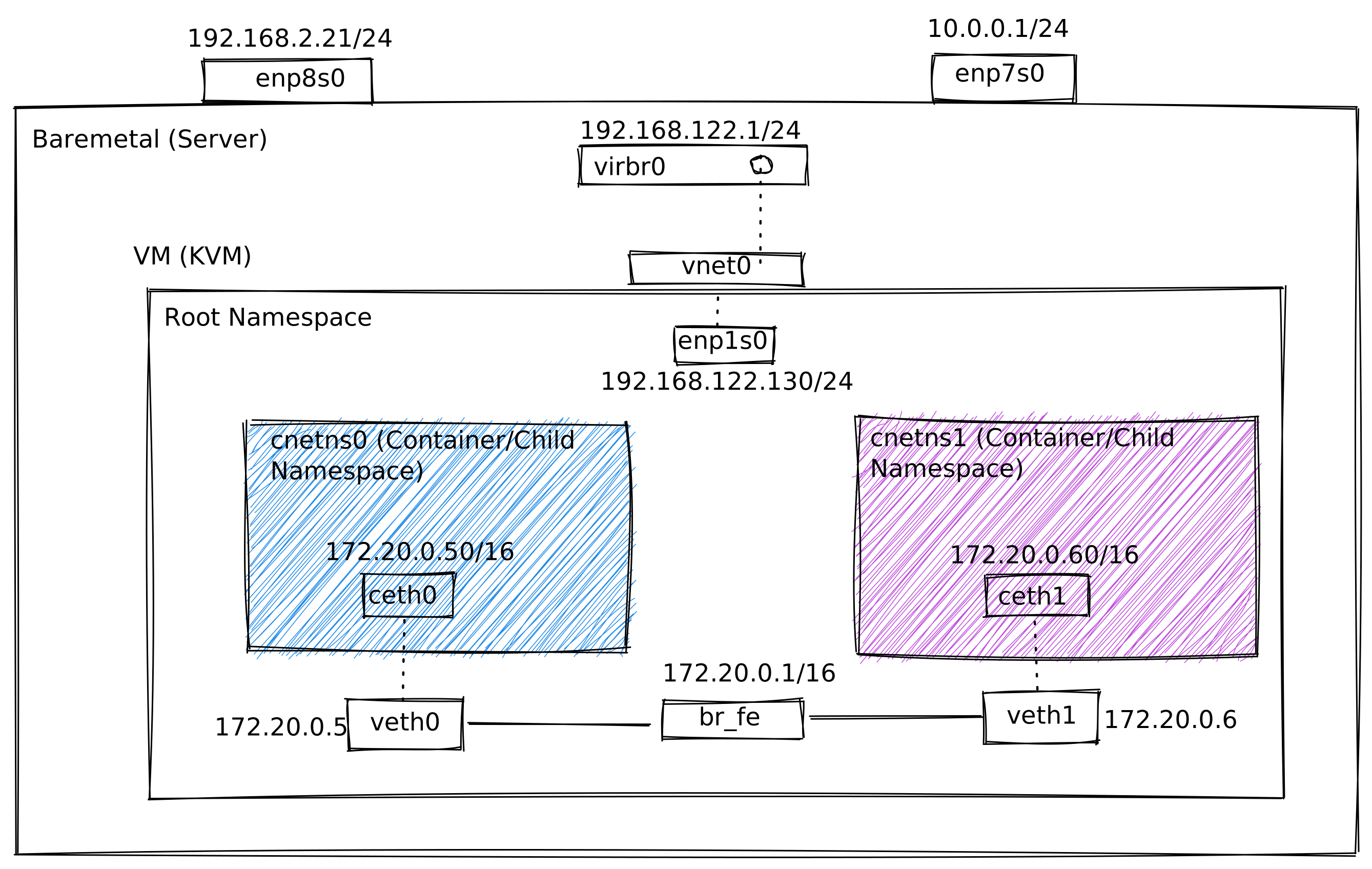
A quick recap from the web, a network namespace is logically another copy of the network stack, with its own routes, firewall rules, and network devices. A practical experiment will always helps you to get a better and deeper understanding and so the goal, as depicted in the diagram is to setup two network namespaces and necessary routing to mainly understand how the Docker daemons setup namespaces internally while running container namespaces.
Default/Current State of the VM
What does the current state of the system looks like before any changes were made? The default route to 192.168.122.0/24 is the one for the Guest VM to communicate to the hypervisor network. 172.17.0.0/16 is the one defined for docker daemon this came in as default as part of docker configuration. Leaving this may over complicate the experiment that I would want to ry, but more challenging would be more fun and learning experience.
    [root@rhel8b ~]# ip route show
    default via 192.168.122.1 dev enp1s0 proto dhcp metric 100
    172.17.0.0/16 dev docker0 proto kernel scope link src 172.17.0.1 linkdown
    192.168.122.0/24 dev enp1s0 proto kernel scope link src 192.168.122.130 metric 100

    [root@rhel8b ~]# ip addr show
    1: lo:  mtu 65536 qdisc noqueue state UNKNOWN group default qlen 1000
        link/loopback 00:00:00:00:00:00 brd 00:00:00:00:00:00
        inet 127.0.0.1/8 scope host lo
           valid_lft forever preferred_lft forever
        inet6 ::1/128 scope host
           valid_lft forever preferred_lft forever
    2: enp1s0:  mtu 1500 qdisc fq_codel state UP group default qlen 1000
        link/ether 52:54:00:01:1a:b3 brd ff:ff:ff:ff:ff:ff
        inet 192.168.122.130/24 brd 192.168.122.255 scope global dynamic noprefixroute enp1s0
           valid_lft 3284sec preferred_lft 3284sec
        inet6 2001:db8:ca2:3:1::37/128 scope global dynamic noprefixroute
           valid_lft 2888sec preferred_lft 2888sec
        inet6 fe80::b6c6:db5e:4ae7:956a/64 scope link noprefixroute
           valid_lft forever preferred_lft forever
    3: docker0:  mtu 1500 qdisc noqueue state DOWN group default
        link/ether 02:42:67:e9:9c:2a brd ff:ff:ff:ff:ff:ff
        inet 172.17.0.1/16 brd 172.17.255.255 scope global docker0
           valid_lft forever preferred_lft forever
Setup Namespaces and VETH pairs
Setup the basics first, from the root namespace create two network namespaces called as cnetns0 and cnetns1. Additionally two veth pairs would be created and peer end of each of these veth pairs would then be moved to these newly created namespaces. It's quite normal to have multiple containers on a docker system, so one of the challenges is to identify the peer interface associated. One way to do so is by looking at the interface ID. For eg. The interface ID of veth0 is “5” and the peer name for that veth is ceth0@if5 . So it’s veth<Interface ID> == ceth0@if<Interface ID>
    [root@rhel8b- ~ # ip netns add cnetns0
    [root@rhel8b- ~ # ip netns add cnetns1

    [root@rhel8b- ~ #  ip link add veth0 type veth peer name ceth0
    [root@rhel8b- ~ #  ip link add veth1 type veth peer name ceth1

    [root@rhel8b netns]# ip link set dev ceth0 netns cnetns0
    [root@rhel8b netns]# ip link set dev ceth1 netns cnetns1

    [root@rhel8b netns]#  ip netns exec cnetns0 ip link show
    1: lo:  mtu 65536 qdisc noop state DOWN mode DEFAULT group default qlen 1000
        link/loopback 00:00:00:00:00:00 brd 00:00:00:00:00:00
    4: ceth0@if5:  mtu 1500 qdisc noop state DOWN mode DEFAULT group default qlen 1000
        link/ether 3a:9c:07:b7:10:bd brd ff:ff:ff:ff:ff:ff link-netnsid 0

    [root@rhel8b netns]#  ip netns exec cnetns1 ip link show
    1: lo:  mtu 65536 qdisc noop state DOWN mode DEFAULT group default qlen 1000
        link/loopback 00:00:00:00:00:00 brd 00:00:00:00:00:00
    6: ceth1@if7:  mtu 1500 qdisc noop state DOWN mode DEFAULT group default qlen 1000
        link/ether f6:0e:f5:ee:d1:7e brd ff:ff:ff:ff:ff:ff link-netnsid 0
Configure IP address.
Once the network namespaces and veth pairs are in place, the basic setup is to configure the peer end with it's own IP's. Since 172.16.0.0/16 is already assigned to the docker network I chose to go with 172.20.0.0/16 and with the help of "nsenter" command I can switch to the respective the namespaces and run standard linux stack commands to configure the ip addresses.
    [root@rhel8b netns]# nsenter --net=/var/run/netns/cnetns0 bash

    [root@rhel8b netns]# ip link show
    1: lo:  mtu 65536 qdisc noop state DOWN mode DEFAULT group default qlen 1000
        link/loopback 00:00:00:00:00:00 brd 00:00:00:00:00:00
    4: ceth0@if5:  mtu 1500 qdisc noop state DOWN mode DEFAULT group default qlen 1000
        link/ether 3a:9c:07:b7:10:bd brd ff:ff:ff:ff:ff:ff link-netnsid 0

    [root@rhel8b netns]#  ip addr show
    1: lo:  mtu 65536 qdisc noop state DOWN group default qlen 1000
        link/loopback 00:00:00:00:00:00 brd 00:00:00:00:00:00
    4: ceth0@if5:  mtu 1500 qdisc noop state DOWN group default qlen 1000
        link/ether 3a:9c:07:b7:10:bd brd ff:ff:ff:ff:ff:ff link-netnsid 0

    [root@rhel8b netns]# ip addr add 172.20.0.50/16 dev ceth0

    [root@rhel8b netns]# ip addr show
    1: lo:  mtu 65536 qdisc noop state DOWN group default qlen 1000
        link/loopback 00:00:00:00:00:00 brd 00:00:00:00:00:00
    4: ceth0@if5:  mtu 1500 qdisc noop state DOWN group default qlen 1000
        link/ether 3a:9c:07:b7:10:bd brd ff:ff:ff:ff:ff:ff link-netnsid 0
        inet 172.20.0.50/16 scope global ceth0
           valid_lft forever preferred_lft forever

    [root@rhel8b netns]# ip route show
Ensure we have routes.
Though the IP's were added in the previous setup, physical links are down still and has not been brought up yet and due to this we have missing routes. Routing information was automatically added by the Linux network stack one the IP address was configured and the interfaces were brought up.
    [root@rhel8b netns]# ip link set ceth0 up
    [root@rhel8b netns]# ip link set lo up

    [root@rhel8b netns]# ip link show
    1: lo:  mtu 65536 qdisc noqueue state UNKNOWN mode DEFAULT group default qlen 1000
        link/loopback 00:00:00:00:00:00 brd 00:00:00:00:00:00
    4: ceth0@if5:  mtu 1500 qdisc noqueue state LOWERLAYERDOWN mode DEFAULT group default qlen 1000
        link/ether 3a:9c:07:b7:10:bd brd ff:ff:ff:ff:ff:ff link-netnsid 0

    [root@rhel8b netns]# ip addr show
    1: lo:  mtu 65536 qdisc noqueue state UNKNOWN group default qlen 1000
        link/loopback 00:00:00:00:00:00 brd 00:00:00:00:00:00
        inet 127.0.0.1/8 scope host lo
           valid_lft forever preferred_lft forever
        inet6 ::1/128 scope host
           valid_lft forever preferred_lft forever
    4: ceth0@if5:  mtu 1500 qdisc noqueue state LOWERLAYERDOWN group default qlen 1000
        link/ether 3a:9c:07:b7:10:bd brd ff:ff:ff:ff:ff:ff link-netnsid 0
        inet 172.20.0.50/16 scope global ceth0
           valid_lft forever preferred_lft forever

        Note:
        The state of ceth0 is showing “LOWERLAYERDOWN”, though the interface itself is "" since
        the other end of the veth pair was only added and has not been brought up. Also by bringing this up
        the routes are also plugged into the routing table which in the previous output was empty.

    [root@rhel8b netns]# ip route show
    172.20.0.0/16 dev ceth0 proto kernel scope link src 172.20.0.50 linkdown

    #Open another terminal and run similar commands on the cnetns1 to complete the configuration.

        nsenter --net=/var/run/netns/cnetns1 bash
        ip link set lo up
        ip link set ceth1 up
        ip addr add 172.20.0.60/16 dev ceth1
        ip add show
Setup veth pair on the root namespace.
Ensure the veth pair on the root namespace is configured and brought up. Also add the IP addresses for each of these VETH pairs to see if we can establish connectivity between all 3 namespaces without having to configure a bridge as pictured in the diagram.
    #Before snap: state => "DOWN"
    [root@rhel8b ~]# ip link show veth0
    5: veth0@if4:  mtu 1500 qdisc noop state DOWN mode DEFAULT group default qlen 1000
        link/ether 32:e4:7c:d5:bd:8f brd ff:ff:ff:ff:ff:ff link-netns cnetns0

    [root@rhel8b ~]# ip link show veth1
    7: veth1@if6:  mtu 1500 qdisc noop state DOWN mode DEFAULT group default qlen 1000
        link/ether ea:c9:3d:5b:64:59 brd ff:ff:ff:ff:ff:ff link-netns cnetns1

    [root@rhel8b ~]#ip link set dev veth0 up
    [root@rhel8b ~]#ip link set dev veth1 up

    #After snap: state => "UP"

    [root@rhel8b ~]# ip link show veth0
    5: veth0@if4:  mtu 1500 qdisc noqueue state UP mode DEFAULT group default qlen 1000
        link/ether 32:e4:7c:d5:bd:8f brd ff:ff:ff:ff:ff:ff link-netns cnetns0

    [root@rhel8b ~]# ip link show veth1
    7: veth1@if6:  mtu 1500 qdisc noqueue state UP mode DEFAULT group default qlen 1000
        link/ether ea:c9:3d:5b:64:59 brd ff:ff:ff:ff:ff:ff link-netns cnetns1

    Note:
    After the peer has been brought up, the interface status of ceth0 and ceth1 within the network namespaces are
    changed from “LOWERLAYERDOWN” to  “UP” as seen below.

    [root@rhel8b-cnetns0 ~ # ip link show ceth0
    4: ceth0@if5:  mtu 1500 qdisc noqueue state UP mode DEFAULT group default qlen 1000
        link/ether 3a:9c:07:b7:10:bd brd ff:ff:ff:ff:ff:ff link-netnsid 0

    [root@rhel8b-cnetns1 ~ # ip link show ceth1
    6: ceth1@if7:  mtu 1500 qdisc noqueue state UP mode DEFAULT group default qlen 1000
        link/ether f6:0e:f5:ee:d1:7e brd ff:ff:ff:ff:ff:ff link-netnsid 0

    #Before snap of routing
    [root@rhel8b ~]# ip route show
    default via 192.168.122.1 dev enp1s0 proto dhcp metric 100
    172.17.0.0/16 dev docker0 proto kernel scope link src 172.17.0.1 linkdown
    192.168.122.0/24 dev enp1s0 proto kernel scope link src 192.168.122.130 metric 100

    #Configure IP addresses for VETH pair.
    [root@rhel8b ~]# ip addr add 172.20.0.5/16 dev veth0
    [root@rhel8b ~]# ip addr add 172.20.0.6/16 dev veth1

    #After snap of routing
    [root@rhel8b ~]# ip route show
    default via 192.168.122.1 dev enp1s0 proto dhcp metric 100
    172.17.0.0/16 dev docker0 proto kernel scope link src 172.17.0.1 linkdown
    172.20.0.0/16 dev veth0 proto kernel scope link src 172.20.0.5
    172.20.0.0/16 dev veth1 proto kernel scope link src 172.20.0.6
    192.168.122.0/24 dev enp1s0 proto kernel scope link src 192.168.122.130 metric 100
Reachability tests.
Basic setups are done, with the biggest difference being it's not what we originally intended. There's no physical bridge configured, rather two VETH's with it's own IP addresses. This is to understand the limitations to this approach and how bridge can help solve for this limitation.
    The basic 3 use-cases that I want to test it out are as follows.

    a) Can cnetns0/cnetns1 can talk to each other - are the IP's for each reachable?
    b) Can the VM/root namespace reach the IP’s defined on cnetns0/cnetns1?
    c) Lastly - If above all are working, can we reach internet from cnetns0/cnetns1?

    #Additional notes
    Since there are two terminals/sessions opened to two different network NS, to identify the sessions, change
    the PS1 (prompt) so it's easier.

    export PS1="[\u@\h-$(ip netns identify $(echo $$)) \w # "
Reachability Tests - Contd.
Based on the ping results, the communication to cnetns1 is completely broken between the tests carried out to validate use-case #a and use-case #b. Why would that be?
    #From rootns to cnetns0 and cnetns1

    [root@rhel8b ~]# ping -c 1 172.20.0.50
    PING 172.20.0.50 (172.20.0.50) 56(84) bytes of data.
    64 bytes from 172.20.0.50: icmp_seq=1 ttl=64 time=0.055 ms

    --- 172.20.0.50 ping statistics ---
    1 packets transmitted, 1 received, 0% packet loss, time 0ms
    rtt min/avg/max/mdev = 0.055/0.055/0.055/0.000 ms

    [root@rhel8b ~]# ping -c 1 172.20.0.60
    PING 172.20.0.60 (172.20.0.60) 56(84) bytes of data.
    From 172.20.0.5 icmp_seq=1 Destination Host Unreachable

    --- 172.20.0.60 ping statistics ---
    1 packets transmitted, 0 received, +1 errors, 100% packet loss, time 0ms

    #From cnetns0 to rootns and cnetns1

    [root@rhel8b-cnetns0 ~ # ping -c 1 172.20.0.5
    PING 172.20.0.5 (172.20.0.5) 56(84) bytes of data.
    64 bytes from 172.20.0.5: icmp_seq=1 ttl=64 time=0.060 ms

    --- 172.20.0.5 ping statistics ---
    1 packets transmitted, 1 received, 0% packet loss, time 0ms
    rtt min/avg/max/mdev = 0.060/0.060/0.060/0.000 ms

    [root@rhel8b-cnetns0 ~ # ping -c1 172.20.0.60
    PING 172.20.0.60 (172.20.0.60) 56(84) bytes of data.
    From 172.20.0.50 icmp_seq=1 Destination Host Unreachable

    --- 172.20.0.60 ping statistics ---
    1 packets transmitted, 0 received, +1 errors, 100% packet loss, time 0ms

    #From cnetns1 to rootns and cnetns0

    [root@rhel8b-cnetns1 ~ # ping -c 1 172.20.0.6
    PING 172.20.0.6 (172.20.0.6) 56(84) bytes of data.
    From 172.20.0.60 icmp_seq=1 Destination Host Unreachable

    --- 172.20.0.6 ping statistics ---
    1 packets transmitted, 0 received, +1 errors, 100% packet loss, time 0ms

    [root@rhel8b-cnetns1 ~ # ping -c 1 172.20.0.50
    PING 172.20.0.50 (172.20.0.50) 56(84) bytes of data.
    From 172.20.0.60 icmp_seq=1 Destination Host Unreachable

    --- 172.20.0.50 ping statistics ---
    1 packets transmitted, 0 received, +1 errors, 100% packet loss, time 0ms

    So the routes are good from rootns and cnetns0  because of which they are reachable but the pings from
    cnetns1 resulted in   100% packet loss!
Static routes!
The culprit is the static route. There are two static routes which was autopopulated by the network stack. 172.20.0.0/16 dev veth0 proto kernel scope link src 172.20.0.5 172.20.0.0/16 dev veth1 proto kernel scope link src 172.20.0.6 As it get's resolved in the order of precedence, any packet destined towards the subnet 172.20.0.0/16 will be going out of veth0 interface with an IP address of 172.20.0.5 as that being the first per precedence. Additional way to solidify the theory is to look at the routing cache, which indicates the same that in order to get to 172.20.0.60, the packet goes through the veth0. [root@rhel8b ~]# ip route get 172.20.0.60 172.20.0.60 dev veth0 src 172.20.0.5 uid 0 cache So if we move the order of these routes, by bringing the route to 172.20.0.6 up - then that will break the communication to cnetns0. This is where the bridges would come into help!
    [root@rhel8b ~]# ip route show
    default via 192.168.122.1 dev enp1s0 proto dhcp metric 100
    172.17.0.0/16 dev docker0 proto kernel scope link src 172.17.0.1 linkdown
    172.20.0.0/16 dev veth0 proto kernel scope link src 172.20.0.5
    172.20.0.0/16 dev veth1 proto kernel scope link src 172.20.0.6
    192.168.122.0/24 dev enp1s0 proto kernel scope link src 192.168.122.130 metric 100
Network Bridge!
A network bridge acts on the L2 layer, this means no routing but only switching and all it knows is MAC addresses associated with each interface. Firt thing to do is to delete the IP addresses defined for the veth pairs on the root namespace and create a new bridge and make this is a master for the veth pairs.
    Delete the IP addresses associated with the veth0 and veth1

    [root@rhel8b ~]# ip addr delete 172.20.0.5/16 dev veth0
    [root@rhel8b ~]# ip addr delete 172.20.0.6/16 dev veth1

    #Flusing these out will also remove the routes that were added.

    [root@rhel8b ~]# ip route show
    default via 192.168.122.1 dev enp1s0 proto dhcp metric 100
    172.17.0.0/16 dev docker0 proto kernel scope link src 172.17.0.1 linkdown
    192.168.122.0/24 dev enp1s0 proto kernel scope link src 192.168.122.130 metric 100

    [root@rhel8b ~]# ip link add br00 type bridge
    [root@rhel8b ~]# ip link set br00 up

    [root@rhel8b ~]# ip link set veth0 master br00
    [root@rhel8b ~]# ip link set veth1 master br00

    [root@rhel8b ~]# ip link show br00
    8: br00:  mtu 1500 qdisc noqueue state UNKNOWN mode DEFAULT group default qlen 1000
        link/ether 82:5c:78:97:0b:f4 brd ff:ff:ff:ff:ff:ff

    [root@rhel8b ~]# ip link show
    1: lo:  mtu 65536 qdisc noqueue state UNKNOWN mode DEFAULT group default qlen 1000
        link/loopback 00:00:00:00:00:00 brd 00:00:00:00:00:00
    2: enp1s0:  mtu 1500 qdisc fq_codel state UP mode DEFAULT group default qlen 1000
        link/ether 52:54:00:01:1a:b3 brd ff:ff:ff:ff:ff:ff
    3: docker0:  mtu 1500 qdisc noqueue state DOWN mode DEFAULT group default
        link/ether 02:42:67:e9:9c:2a brd ff:ff:ff:ff:ff:ff
    5: veth0@if4:  mtu 1500 qdisc noqueue master br00 state UP mode DEFAULT group default qlen 1000
        link/ether 32:e4:7c:d5:bd:8f brd ff:ff:ff:ff:ff:ff link-netns cnetns0
    7: veth1@if6:  mtu 1500 qdisc noqueue master br00 state UP mode DEFAULT group default qlen 1000
        link/ether ea:c9:3d:5b:64:59 brd ff:ff:ff:ff:ff:ff link-netns cnetns1
    8: br00:  mtu 1500 qdisc noqueue state UP mode DEFAULT group default qlen 1000
        link/ether 32:e4:7c:d5:bd:8f brd ff:ff:ff:ff:ff:ff

    #Mac addresses of both the interfaces are learned in each of these namespaces.

    [root@rhel8b-cnetns0 ~ # ip neigh
    172.20.0.60 dev ceth0 lladdr f6:0e:f5:ee:d1:7e STALE

    [root@rhel8b-cnetns0 ~ # ip link show
    1: lo:  mtu 65536 qdisc noqueue state UNKNOWN mode DEFAULT group default qlen 1000
        link/loopback 00:00:00:00:00:00 brd 00:00:00:00:00:00
    4: ceth0@if5:  mtu 1500 qdisc noqueue state UP mode DEFAULT group default qlen 1000
        link/ether 3a:9c:07:b7:10:bd brd ff:ff:ff:ff:ff:ff link-netnsid 0

    [root@rhel8b-cnetns1 ~ # ip neigh
    172.20.0.50 dev ceth1 lladdr 3a:9c:07:b7:10:bd STALE

    [root@rhel8b-cnetns1 ~ # ip link show
    1: lo:  mtu 65536 qdisc noqueue state UNKNOWN mode DEFAULT group default qlen 1000
        link/loopback 00:00:00:00:00:00 brd 00:00:00:00:00:00
    6: ceth1@if7:  mtu 1500 qdisc noqueue state UP mode DEFAULT group default qlen 1000
        link/ether f6:0e:f5:ee:d1:7e brd ff:ff:ff:ff:ff:ff link-netnsid 0
Re-do the reachability tests!
Let's re-do the tests, the assumption is with bridge in place it should all work but while reviewing the output we can see it's not working.
    So we have two issues now with the bridge in place.

    a) Root NS cannot talk to cnetns0/cnetns1.
    b) cnetns cannot talk to each other.
    c) Internet reachability from cnetns* namespaces. (Still open/haven't tested yet)
Resolving rootns reachability!
Root NS cannot to ceth0 and ceth1 on the child namespaces. Looking at the routes, any IP’s destined to subnet 172.17.0.0/16 will be going out of docker0 interface and any destined to 192.168.122.0/24 will be going out of enp1s0 interface. Everything else rest will be routed via default route - which is "default via 192.168.122.1 dev enp1s0" So this means a ping to 172.20.0.50 will be picked by the default route and a quick packet capture proves this theory.
    [root@rhel8b ~]# ping -c1 172.20.0.50
    PING 172.20.0.50 (172.20.0.50) 56(84) bytes of data.

    --- 172.20.0.50 ping statistics ---
    1 packets transmitted, 0 received, 100% packet loss, time 0ms

    [root@rhel8b ~]# ip route show
    default via 192.168.122.1 dev enp1s0 proto dhcp metric 100
    172.17.0.0/16 dev docker0 proto kernel scope link src 172.17.0.1 linkdown
    192.168.122.0/24 dev enp1s0 proto kernel scope link src 192.168.122.130 metric 100

    Let me try a tcpdump to validate the theory (before the static route is added to see if the packets are
    hitting the wire on the enp1s0 ).

    [root@rhel8b ~]# tcpdump -nni enp1s0 net 172.20.0.0/16
    dropped privs to tcpdump
    tcpdump: verbose output suppressed, use -v or -vv for full protocol decode
    listening on enp1s0, link-type EN10MB (Ethernet), capture size 262144 bytes
    14:06:12.876136 IP 192.168.122.130 > 172.20.0.50: ICMP echo request, id 6820, seq 1, length 64
Configure the L2 Switch/Bridge to be L3 aware/compatible!
Since the bridge we configured is only L2 aware, there's no routing or rather routes configured by the network stack. So what we need is to make this bridge L3 compatible by providing it an IP address. br00 is essentially a gateway for the entire subnet, if we had multiple namespaces all of these would be going via bridge. So let's assign the GTWY ip to br00 and we can see below that once IP has been added a new route has been configured automatically by the network stack "172.20.0.0/16 dev br00 "
    [root@rhel8b ~]# ip addr add 172.20.0.1/16 dev br00

    [root@rhel8b ~]# ip addr show br00
    8: br00:  mtu 1500 qdisc noqueue state UP group default qlen 1000
        link/ether 32:e4:7c:d5:bd:8f brd ff:ff:ff:ff:ff:ff
        inet 172.20.0.1/16 scope global br00
           valid_lft forever preferred_lft forever
        inet6 fe80::30e4:7cff:fed5:bd8f/64 scope link
           valid_lft forever preferred_lft forever

    [root@rhel8b ~]# ip route show
    default via 192.168.122.1 dev enp1s0 proto dhcp metric 100
    172.17.0.0/16 dev docker0 proto kernel scope link src 172.17.0.1 linkdown
    172.20.0.0/16 dev br00 proto kernel scope link src 172.20.0.1
    192.168.122.0/24 dev enp1s0 proto kernel scope link src 192.168.122.130 metric 100

    #RootNS now can talk to both cnetns0/cnetns1.

    [root@rhel8b ~]# ping -c1 172.20.0.50
    PING 172.20.0.50 (172.20.0.50) 56(84) bytes of data.
    64 bytes from 172.20.0.50: icmp_seq=1 ttl=64 time=0.089 ms

    --- 172.20.0.50 ping statistics ---
    1 packets transmitted, 1 received, 0% packet loss, time 0ms
    rtt min/avg/max/mdev = 0.089/0.089/0.089/0.000 ms

    So with the route in place , the rootns now can reach to the cnetns0 and cnetns1

    Issue still exists where the cnetns namespaces can’t talk to each other still..
Reachability issue between the child network namespaces!
It took me a while to figure this out, so breaking down the issue/triaging experiment for future reference. From the cnetns0/cnetns1 , the gateway IP/br00 is reachable but neither of these IP's (172.20.0.60/172.20.0.50) defined can talk to each other!. IP neigh output also stresses the fact that there’s no issue on the L2 layer, MAC’s on br00 and as well the respective interfaces - ceth0 and ceth1 are learned. This means bridge/L2 layer is completely in tact, yet on the L3 there’s some issue!
    [root@rhel8b-cnetns0 ~ # ping -c1 172.20.0.60
    PING 172.20.0.60 (172.20.0.60) 56(84) bytes of data.

    --- 172.20.0.60 ping statistics ---
    1 packets transmitted, 0 received, 100% packet loss, time 0ms

    [root@rhel8b-cnetns0 ~ # ping -c1 172.20.0.60
    PING 172.20.0.60 (172.20.0.60) 56(84) bytes of data.

    --- 172.20.0.60 ping statistics ---
    1 packets transmitted, 0 received, 100% packet loss, time 0ms


    [root@rhel8b ~]# tcpdump -nni br00 net 172.20.0.0/16
    dropped privs to tcpdump
    tcpdump: verbose output suppressed, use -v or -vv for full protocol decode
    listening on br00, link-type EN10MB (Ethernet), capture size 262144 bytes
    14:53:33.614918 IP 172.20.0.50 > 172.20.0.60: ICMP echo request, id 6900, seq 1, length 64
    14:53:38.758399 ARP, Request who-has 172.20.0.60 tell 172.20.0.50, length 28
    14:53:38.758479 ARP, Reply 172.20.0.60 is-at f6:0e:f5:ee:d1:7e, length 28

    [root@rhel8b-cnetns1 ~ # tcpdump -nni ceth1 net 172.20.0.0/16
    dropped privs to tcpdump
    tcpdump: verbose output suppressed, use -v or -vv for full protocol decode
    listening on ceth1, link-type EN10MB (Ethernet), capture size 262144 bytes
    14:53:38.758447 ARP, Request who-has 172.20.0.60 tell 172.20.0.50, length 28
    14:53:38.758477 ARP, Reply 172.20.0.60 is-at f6:0e:f5:ee:d1:7e, length 28

    MAC Address’s learned by ceth0 and ceth1

    [root@rhel8b-cnetns0 ~ # ip neigh
    172.20.0.60 dev ceth0 lladdr f6:0e:f5:ee:d1:7e STALE
    172.20.0.1 dev ceth0 lladdr 32:e4:7c:d5:bd:8f STALE

    [root@rhel8b-cnetns1 ~ # ip neigh
    172.20.0.1 dev ceth1 lladdr 32:e4:7c:d5:bd:8f STALE
    172.20.0.50 dev ceth1 lladdr 3a:9c:07:b7:10:bd STALE

    Conclusion:
    Everything seems to be perfectly file on the L2 layer, so focus the investigation on the L3 layer!
L3/Routing issue!
This is the one where I spent most of the time. Based on the ARP reply/response and as well the L2 checks being done, it’s clear that there’s some issue on the L3 and that too on the rootns. I also see the routes are in place. Only other suspicion is the IPTABLE/firewall rules though I haven't injected any rules. I wanted to analyze it still, but there are rules that are pre-configured for docker daemon since I never un-installed that from the VM. As noted previously, I kept it use it as a reference and also to see if that would introduce any challenges and indeed! It did :-( Meanwhile a quick re-cap on the iptable rules! Lot’s of good articles on the IPTables, here's one I used for reference amongst many (https://www.teldat.com/blog/nftables-and-netfilter-hooks-via-linux-kernel/) “When a network packet is received on a network device, it first passes through the Prerouting hook. This is where the routing decision takes place. The kernel decides whether the packet is destined for a local process (e.g., a listening socket on a server in this system) or whether to forward it (system operates as a router). In the first case, the packet passes the Input hook and is then handed over to the local process. If the packet is destined to be forwarded, it traverses the Forward hook and then a final Postrouting hook before being sent out on a network device. For packets that are generated locally (e.g., by a client or server process that likes sending things out), they must first pass the Output hook and then the Postrouting hook before being sent out on a network device.” So this means, I should definitely check the “FORWARDING” rule of the iptables and probably the “PRE-ROUTING” and “POST-ROUTING” as well eventually! Later is not something I’m not too clear, but while doing the experiments I am hoping to get a better picture. The best of my understanding is I can focus only on the “FILTER” table, since I’m not using any natting , NAT table shouldn’t come into play. Same for “MANGLE” as there’s nothing involved in modifying IP headers. RAW is used for connection tracking as per the documentation and SECURITY is for security purposes. SO I can now focus on the “FILTER” Within the “FILTER”, since it’s a packet that must be forwarded on the bridge from cnetns0 to cnetns1 (a packet destined to another interface ) on a separate namespace and it’s likely that if any of the rules is affecting this it must be “FORWARD”. A quick dump on the iptable rules indicates two things a) There are some packets that are dropped already "DROP 15", I don't know for sure if these are my pings. b) Default policy is "DROP" and so if none of these rules matches then packets will be dropped.
    [root@rhel8b ~]#  iptables -t filter -L -n -v
    Chain INPUT (policy ACCEPT 32352 packets, 27M bytes)
     pkts bytes target     prot opt in     out     source               destination

    Chain FORWARD (policy DROP 15 packets, 1260 bytes)
     pkts bytes target     prot opt in     out     source               destination
       15  1260 DOCKER-USER  all  --  *      *       0.0.0.0/0            0.0.0.0/0
       15  1260 DOCKER-ISOLATION-STAGE-1  all  --  *      *       0.0.0.0/0            0.0.0.0/0
        0     0 ACCEPT     all  --  *      docker0  0.0.0.0/0            0.0.0.0/0            ctstate RELATED,ESTABLISHED
        0     0 DOCKER     all  --  *      docker0  0.0.0.0/0            0.0.0.0/0
        0     0 ACCEPT     all  --  docker0 !docker0  0.0.0.0/0            0.0.0.0/0
        0     0 ACCEPT     all  --  docker0 docker0  0.0.0.0/0            0.0.0.0/0

    Chain OUTPUT (policy ACCEPT 21299 packets, 1896K bytes)
     pkts bytes target     prot opt in     out     source               destination

    Chain DOCKER (1 references)
     pkts bytes target     prot opt in     out     source               destination

    Chain DOCKER-ISOLATION-STAGE-1 (1 references)
     pkts bytes target     prot opt in     out     source               destination
        0     0 DOCKER-ISOLATION-STAGE-2  all  --  docker0 !docker0  0.0.0.0/0            0.0.0.0/0
       15  1260 RETURN     all  --  *      *       0.0.0.0/0            0.0.0.0/0

    Chain DOCKER-ISOLATION-STAGE-2 (1 references)
     pkts bytes target     prot opt in     out     source               destination
        0     0 DROP       all  --  *      docker0  0.0.0.0/0            0.0.0.0/0
        0     0 RETURN     all  --  *      *       0.0.0.0/0            0.0.0.0/0

    Chain DOCKER-USER (1 references)
     pkts bytes target     prot opt in     out     source               destination
       15  1260 RETURN     all  --  *      *       0.0.0.0/0            0.0.0.0/0
Debug packet drops by analyzing IPTABLE rules!
I want to see if the packet drop counter on any of these rules has a change before and after a ping and based on the output there’s a packet that’s DROPPED in the “FORWARD” policy. < Chain FORWARD (policy DROP 16 packets, 1344 bytes) --- > Chain FORWARD (policy DROP 17 packets, 1428 bytes)
    [root@rhel8b ~]# iptables -L -v -n > /tmp/before_ping_from_cnetns0_to_cnetns1.dat

    [root@rhel8b-cnetns0 ~ # ping -c1 172.20.0.60
    PING 172.20.0.60 (172.20.0.60) 56(84) bytes of data.

    --- 172.20.0.60 ping statistics ---
    1 packets transmitted, 0 received, 100% packet loss, time 0ms

    [root@rhel8b ~]# iptables -L -v -n > /tmp/after_ping_from_cnetns0_to_cnetns1.dat


    [root@rhel8b ~]# diff --color /tmp/before_ping_from_cnetns0_to_cnetns1.dat /tmp/after_ping_from_cnetns0_to_cnetns1.dat
    1c1
    < Chain INPUT (policy ACCEPT 32513 packets, 27M bytes)
    ---
    > Chain INPUT (policy ACCEPT 32613 packets, 27M bytes)
    4c4
    < Chain FORWARD (policy DROP 16 packets, 1344 bytes)
    ---
    > Chain FORWARD (policy DROP 17 packets, 1428 bytes)
    6,7c6,7
    <    16  1344 DOCKER-USER  all  --  *      *       0.0.0.0/0            0.0.0.0/0
    <    16  1344 DOCKER-ISOLATION-STAGE-1  all  --  *      *       0.0.0.0/0            0.0.0.0/0
    ---
    >    17  1428 DOCKER-USER  all  --  *      *       0.0.0.0/0            0.0.0.0/0
    >    17  1428 DOCKER-ISOLATION-STAGE-1  all  --  *      *       0.0.0.0/0            0.0.0.0/0
    13c13
    < Chain OUTPUT (policy ACCEPT 21387 packets, 1914K bytes)
    ---
    > Chain OUTPUT (policy ACCEPT 21439 packets, 1920K bytes)
    22c22
    <    16  1344 RETURN     all  --  *      *       0.0.0.0/0            0.0.0.0/0
    ---
    >    17  1428 RETURN     all  --  *      *       0.0.0.0/0            0.0.0.0/0
    31c31
    <    16  1344 RETURN     all  --  *      *       0.0.0.0/0            0.0.0.0/0
    ---
    >    17  1428 RETURN     all  --  *      *       0.0.0.0/0            0.0.0.0/0
Injecting IPTABLE rules to resolve the packet drops!
Since I'm sure now, it's the FORWARDING chain dropping my ICMP packets - need to look deeper into two things. a) What's exact chain rule resulting in this drop and why? b) How to fix it. Had I shutdown my docker daemon, this experiment would've been much more straight forward but I'm really glad that I didn't. Helped me to venture into something more challenging and thus fun and obviously more learning here. Coming back.. a) What's exact chain rule resulting in this drop and why? FORWARDING chain sequentially goes through 3 different custom chains created by DOCKER and if none of these rules are applicable the DEFAULT policy kicks in which is to "DROP" So to check if my theory is right, created a new chain called br00 and created rules with a policy of "ACCEPT" for any packets that are destined to 172.20.0.0/16 coming in/out of br00 interface to be handed over to the new "br00" chain I created.
    # Take a backup of the existing rules.

    iptables-save > /root/iptables.original

    iptables -N br00
    iptables -A br00 -m limit --limit 2/min -j LOG --log-prefix "DEBUG: Packets on wire - br00 " --log-level 4
    iptables -A br00  -j ACCEPT
    iptables -A FORWARD -s 172.20.0.0/16 -o br00 -j br00
    iptables -A FORWARD -s 172.20.0.0/16 -i br00 -j br00

    And let’s check if the LOGGING chain has been added

    [root@rhel8b ~]# iptables -t filter -L --line-numbers -n
    Chain INPUT (policy ACCEPT)
    num  target     prot opt source               destination

    Chain FORWARD (policy DROP)
    num  target     prot opt source               destination
    1    DOCKER-USER  all  --  0.0.0.0/0            0.0.0.0/0
    2    DOCKER-ISOLATION-STAGE-1  all  --  0.0.0.0/0            0.0.0.0/0
    3    ACCEPT     all  --  0.0.0.0/0            0.0.0.0/0            ctstate RELATED,ESTABLISHED
    4    DOCKER     all  --  0.0.0.0/0            0.0.0.0/0
    5    ACCEPT     all  --  0.0.0.0/0            0.0.0.0/0
    6    ACCEPT     all  --  0.0.0.0/0            0.0.0.0/0
    7    br00       all  --  172.20.0.0/16        0.0.0.0/0
    8    br00       all  --  172.20.0.0/16        0.0.0.0/0

    Chain OUTPUT (policy ACCEPT)
    num  target     prot opt source               destination

    Chain DOCKER (1 references)
    num  target     prot opt source               destination

    Chain DOCKER-ISOLATION-STAGE-1 (1 references)
    num  target     prot opt source               destination
    1    DOCKER-ISOLATION-STAGE-2  all  --  0.0.0.0/0            0.0.0.0/0
    2    RETURN     all  --  0.0.0.0/0            0.0.0.0/0

    Chain DOCKER-ISOLATION-STAGE-2 (1 references)
    num  target     prot opt source               destination
    1    DROP       all  --  0.0.0.0/0            0.0.0.0/0
    2    RETURN     all  --  0.0.0.0/0            0.0.0.0/0

    Chain DOCKER-USER (1 references)
    num  target     prot opt source               destination
    1    RETURN     all  --  0.0.0.0/0            0.0.0.0/0

    Chain br00 (3 references)
    num  target     prot opt source               destination
    1    LOG        all  --  0.0.0.0/0            0.0.0.0/0            limit: avg 2/min burst 5 LOG flags 0 level 4 prefix "DEBUG: Packets on wire - br00"
    2    ACCEPT     all  --  0.0.0.0/0            0.0.0.0/0
Redo the ICMP tests now with IPTABLE FORWARDING rules in place. Solved!
Do a ping to see and see what get’s into the /var/log/messages ( the rules pushed by IPTABLES ) logging chain.
    [root@rhel8b-cnetns0 ~ # ping -c1 172.20.0.60
    PING 172.20.0.60 (172.20.0.60) 56(84) bytes of data.
    64 bytes from 172.20.0.60: icmp_seq=1 ttl=64 time=0.094 ms

    --- 172.20.0.60 ping statistics ---
    1 packets transmitted, 1 received, 0% packet loss, time 0ms
    rtt min/avg/max/mdev = 0.094/0.094/0.094/0.000 ms

    [root@rhel8b ~]# tail -2f /var/log/messages
    ....
    Dec 22 17:16:10 rhel8b kernel: DEBUG: Packets on wire - br00IN=br00 OUT=br00 PHYSIN=veth0 PHYSOUT=veth1 MAC=f6:0e:f5:ee:d1:7e:3a:9c:07:b7:10:bd:08:00 SRC=172.20.0.50 DST=172.20.0.60 LEN=84 TOS=0x00 PREC=0x00 TTL=64 ID=35184 DF PROTO=ICMP TYPE=8 CODE=0 ID=7316 SEQ=1
    Dec 22 17:16:10 rhel8b kernel: DEBUG: Packets on wire - br00IN=br00 OUT=br00 PHYSIN=veth1 PHYSOUT=veth0 MAC=3a:9c:07:b7:10:bd:f6:0e:f5:ee:d1:7e:08:00 SRC=172.20.0.60 DST=172.20.0.50 LEN=84 TOS=0x00 PREC=0x00 TTL=64 ID=21476 PROTO=ICMP TYPE=0 CODE=0 ID=7316 SEQ=1


    [root@rhel8b-cnetns1 ~ # ping -c1 172.20.0.50
    PING 172.20.0.50 (172.20.0.50) 56(84) bytes of data.
    64 bytes from 172.20.0.50: icmp_seq=1 ttl=64 time=0.106 ms

    --- 172.20.0.50 ping statistics ---
    1 packets transmitted, 1 received, 0% packet loss, time 0ms
    rtt min/avg/max/mdev = 0.106/0.106/0.106/0.000 ms


    [root@rhel8b ~]# tail -2f /var/log/messages
    …output trimmed…
    ====
    Dec 22 17:17:21 rhel8b kernel: DEBUG: Packets on wire - br00IN=br00 OUT=br00 PHYSIN=veth1 PHYSOUT=veth0 MAC=3a:9c:07:b7:10:bd:f6:0e:f5:ee:d1:7e:08:00 SRC=172.20.0.60 DST=172.20.0.50 LEN=84 TOS=0x00 PREC=0x00 TTL=64 ID=24247 DF PROTO=ICMP TYPE=8 CODE=0 ID=7317 SEQ=1
    Dec 22 17:17:21 rhel8b kernel: DEBUG: Packets on wire - br00IN=br00 OUT=br00 PHYSIN=veth0 PHYSOUT=veth1 MAC=f6:0e:f5:ee:d1:7e:3a:9c:07:b7:10:bd:08:00 SRC=172.20.0.50 DST=172.20.0.60 LEN=84 TOS=0x00 PREC=0x00 TTL=64 ID=12916 PROTO=ICMP TYPE=0 CODE=0 ID=7317 SEQ=1
Summarizing
Since the settings are all ephemeral, wanted to recap and consolidate it all so I can easily apply after any VM shutdowns.
# ROOTNS
export PS1="[\u@\h-$(ip netns identify $(echo $$)) \w # "

# Create network namespaces
ip netns add cnetns0
ip netns add cnetns1

# Configure veth pairs and bring those up.

ip link add veth0 type veth peer name ceth0
ip link add veth1 type veth peer name ceth1

ip link set dev ceth0 netns cnetns0
ip link set dev ceth1 netns cnetns1
ip link set dev veth0 up
ip link set dev veth1 up

# Create the bridge and assign the IP address.

ip link add br00 type bridge
ip addr add 172.20.0.1/16 dev br00
ip addr show br00
ip link set br00 up

# Set the bridge interface as master for the veth pairs.

ip link set veth0 master br00
ip link set veth1 master br00

# CNETNS0

nsenter --net=/var/run/netns/cnetns0 bash
export PS1="[\u@\h-$(ip netns identify $(echo $$)) \w # "

ip link set lo up
ip link set ceth0 up
ip addr add 172.20.0.50/16 dev ceth0
ip addr show
ip route show

# CNETNS1

export PS1="[\u@\h-$(ip netns identify $(echo $$)) \w # "
nsenter --net=/var/run/netns/cnetns1 bash

ip link set lo up
ip link set ceth1 up
ip addr add 172.20.0.60/16 dev ceth1
ip addr show
ip route show


# IPTABLE UPDATE

iptables -N br00
iptables -A br00 -m limit --limit 2/min -j LOG --log-prefix "DEBUG: Packets on wire - br00 " --log-level 4
iptables -A br00  -j ACCEPT
iptables -A FORWARD -s 172.20.0.0/16 -o br00 -j br00
iptables -A FORWARD -s 172.20.0.0/16 -i br00 -j br00

# ICMP TESTS.

ping -c1 172.20.0.60
ping -c1 172.20.0.50
ping -c1 172.20.0.1
ping -c1 8.8.8.8

Note: This excludes all the tests carried out so far, one yet to be done is the internet reachability one.
Default Routes!
One pending issue still is that cnetns0/cnetns1 can't talk to internet still. So the first thing to check is the default routes configured under these namespaces. Ping output indciates network isn't reachabile, this means there are no routes defined to reach an IP in public space! Adding default routes is the first step towards solving this issue.
[root@rhel8b-cnetns0 ~ # ping -c1 8.8.8.8
connect: Network is unreachable

[root@rhel8b-cnetns0 ~ # ip route get 8.8.8.8
RTNETLINK answers: Network is unreachable

#Add the default route via br00 gateway IP.

[root@rhel8b-cnetns0 ~ # ip route add default via 172.20.0.1

[root@rhel8b-cnetns0 ~ # ip route show
default via 172.20.0.1 dev ceth0
172.20.0.0/16 dev ceth0 proto kernel scope link src 172.20.0.50

[root@rhel8b-cnetns0 ~ # ip route get 8.8.8.8
8.8.8.8 via 172.20.0.1 dev ceth0 src 172.20.0.50 uid 0
    cache

# Trying the ping again, indicates the packets being transmitted but with no response!

[root@rhel8b-cnetns0 ~ # ping -c1 8.8.8.8
PING 8.8.8.8 (8.8.8.8) 56(84) bytes of data.

--- 8.8.8.8 ping statistics ---
1 packets transmitted, 0 received, 100% packet loss, time 0ms
Internet reachability failure!
Since the IP's configured within the cnetns0/cnetns1 are private IP's (RFC1918) which essentially cannot talk to anything on the public IP space, it's essential that there should be some NAT'ing that must happen so the packets can go out to the internet and back. Once thing is clear that from rootns internet is reachable, so the issue is between cnetns0/1 and rootns. Need to look into some data available to see what's going on the rootns because of which the packets aren't going out when a ping -c1 8.8.8.8 is initiated within the child namespace. So we need to add the masquerading rules for source natting but prior to adding the masquerading, wanted to capture the output of the "conntrack" tool output and as well a tcpdump for later review. "conntrack" helps to track NAT connections and can be ran live.
    # Connection tracker indicates
     watch conntrack -L -j

    Every 2.0s: conntrack -L -j                                   rhel8b: Mon Jan  3 19:46:39 2022

    conntrack v1.4.4 (conntrack-tools): 1 flow entries have been shown.
    icmp     1 12 src=172.20.0.50 dst=8.8.8.8 type=8 code=0 id=2833 [UNREPLIED] src=8.8.8.8 dst=17
    2.20.0.50 type=0 code=0 id=2833 mark=0 use=1

    [root@rhel8b ~]# tcpdump -nni enp1s0 net 8.8.8.8/32
    dropped privs to tcpdump
    tcpdump: verbose output suppressed, use -v or -vv for full protocol decode
    listening on enp1s0, link-type EN10MB (Ethernet), capture size 262144 bytes
    19:46:22.552982 IP 172.20.0.50 > 8.8.8.8: ICMP echo request, id 2833, seq 1, length 64
Masquerading and NAT!
As we know from the rootns 8.8.8.8 is reachable and in order for the container to send the packets to the outside world, it should use the IP address of the hosts external interface which in this case 192.168.122.130. So a masquerading rule is appended to the POSTROUTING table to enable so that any packets once it hits the wire, the NAT rule will kick in and swap the source IP from 172.20.0.50 to 192.168.122.130. Updating the masquerading rule and doing ping tests again shows a failure, but there's a difference in behavior which is visible from the outputs/logs captured prior to this rule was added and afterwards. The output, though the ping tests failed indicates a key difference a) On the "conntrak" output, before the NAT the dst was showing as the interface IP of the cnetns0 which is dst=172.20.0.50 and it's changed to dst=192.168.122.130. There's also "UNREPLIED" status indicating no responses received prior to NAT'ing, this means this time around the response was received but never made it to the cnetns0 interface! Packet capture validates this theory. Before Masquerading: src=172.20.0.50 dst=8.8.8.8 type=8 code=0 id=2833 [UNREPLIED] src=8.8.8.8 dst=172.20.0.50 Afer Masquerading src=172.20.0.50 dst=8.8.8.8 type=8 code=0 id=11842 src=8.8.8.8 dst=192.168.122.130 #Packet Capture 14:38:41.566911 IP 192.168.122.130 > 8.8.8.8: ICMP echo request, id 11842, seq 1, length 64 14:38:41.588212 IP 8.8.8.8 > 192.168.122.130: ICMP echo reply, id 11842, seq 1, length 64 So packet reached enp1s0 but never made it to br00! Why?
[root@rhel8b ~]# iptables -t nat -I POSTROUTING -s 172.20.0.0/16 ! -o br00 -j MASQUERADE

[root@rhel8b ~]# iptables -t nat -L -v -n
Chain PREROUTING (policy ACCEPT 31 packets, 8278 bytes)
 pkts bytes target     prot opt in     out     source               destination
    9   612 DOCKER     all  --  *      *       0.0.0.0/0            0.0.0.0/0            ADDRTYPE match dst-type LOCAL

Chain INPUT (policy ACCEPT 9 packets, 612 bytes)
 pkts bytes target     prot opt in     out     source               destination

Chain POSTROUTING (policy ACCEPT 340 packets, 28793 bytes)
 pkts bytes target     prot opt in     out     source               destination
    0     0 MASQUERADE  all  --  *      !br00   172.20.0.0/16        0.0.0.0/0
    0     0 MASQUERADE  all  --  *      !docker0  172.17.0.0/16        0.0.0.0/0

Chain OUTPUT (policy ACCEPT 330 packets, 27953 bytes)
 pkts bytes target     prot opt in     out     source               destination
    1    84 DOCKER     all  --  *      *       0.0.0.0/0           !127.0.0.0/8          ADDRTYPE match dst-type LOCAL

Chain DOCKER (2 references)
 pkts bytes target     prot opt in     out     source               destination
    0     0 RETURN     all  --  docker0 *       0.0.0.0/0            0.0.0.0/0

#Ping is un-successfull again!

[root@rhel8b-cnetns0 ~ # ping -c1 8.8.8.8
PING 8.8.8.8 (8.8.8.8) 56(84) bytes of data.

--- 8.8.8.8 ping statistics ---
1 packets transmitted, 0 received, 100% packet loss, time 0ms

[root@rhel8b ~]# tail -2f /var/log/messages
...
Jan  5 14:38:41 rhel8b kernel: DEBUG: Packets on wire - br00IN=br00 OUT=enp1s0 PHYSIN=veth0 MAC=3a:a5:be:b6:79:8b:7e:57:88:91:9b:2e:08:00 SRC=172.20.0.50 DST=8.8.8.8 LEN=84 TOS=0x00 PREC=0x00 TTL=63 ID=25311 DF PROTO=ICMP TYPE=8 CODE=0 ID=11842 SEQ=1

Every 2.0s: conntrack -L -j                                              rhel8b: Wed Jan  5 14:38:51 2022

conntrack v1.4.4 (conntrack-tools): 1 flow entries have been shown.
icmp     1 20 src=172.20.0.50 dst=8.8.8.8 type=8 code=0 id=11842 src=8.8.8.8 dst=192.168.122.130 type=0 c
ode=0 id=11842 mark=0 use=1

[root@rhel8b ~]# tcpdump -nni enp1s0 net 8.8.8.8/32
dropped privs to tcpdump
tcpdump: verbose output suppressed, use -v or -vv for full protocol decode
listening on enp1s0, link-type EN10MB (Ethernet), capture size 262144 bytes
14:38:41.566911 IP 192.168.122.130 > 8.8.8.8: ICMP echo request, id 11842, seq 1, length 64
14:38:41.588212 IP 8.8.8.8 > 192.168.122.130: ICMP echo reply, id 11842, seq 1, length 64
Shared connection to 192.168.3.2 closed.
Packet drops again at IPTABLES!
Since I'm sure the packet reached the enp1s0/root namespace, if IPTABLE rules are playing a role that must be in the "FORWARDING" chain. The only possibility here is IPTABLES and that should be a "FORWARDING" rule that must be looked at. Before and after snap indicates there's a packet dropped by the forwarding rule, whose default policy is to "DROP".
[root@rhel8b- ~ # iptables -t filter -L -v -n --line-numbers
…

Chain FORWARD (policy DROP 2 packets, 168 bytes)
num   pkts bytes target     prot opt in     out     source               destination
1       10   840 br00       all  --  *      br00    172.20.0.0/16        0.0.0.0/0
2       14  3918 br00       all  --  br00   *       172.20.0.0/16        0.0.0.0/0
3        2   168 DOCKER-USER  all  --  *      *       0.0.0.0/0            0.0.0.0/0
4        2   168 DOCKER-ISOLATION-STAGE-1  all  --  *      *       0.0.0.0/0            0.0.0.0/0
5        0     0 ACCEPT     all  --  *      docker0  0.0.0.0/0            0.0.0.0/0            ctstate RELATED,ESTABLISHED
6        0     0 DOCKER     all  --  *      docker0  0.0.0.0/0            0.0.0.0/0
7        0     0 ACCEPT     all  --  docker0 !docker0  0.0.0.0/0            0.0.0.0/0
8        0     0 ACCEPT     all  --  docker0 docker0  0.0.0.0/0            0.0.0.0/0
..

# Run ping again
[root@rhel8b-cnetns0 ~ # ping -c1 8.8.8.8
PING 8.8.8.8 (8.8.8.8) 56(84) bytes of data.

--- 8.8.8.8 ping statistics ---
1 packets transmitted, 0 received, 100% packet loss, time 0ms

#Take another snap

[root@rhel8b- ~ # iptables -t filter -L -v -n --line-numbers
…
Chain FORWARD (policy DROP 3 packets, 252 bytes)
num   pkts bytes target     prot opt in     out     source               destination
1       10   840 br00       all  --  *      br00    172.20.0.0/16        0.0.0.0/0
2       15  4002 br00       all  --  br00   *       172.20.0.0/16        0.0.0.0/0
3        3   252 DOCKER-USER  all  --  *      *       0.0.0.0/0            0.0.0.0/0
4        3   252 DOCKER-ISOLATION-STAGE-1  all  --  *      *       0.0.0.0/0            0.0.0.0/0
5        0     0 ACCEPT     all  --  *      docker0  0.0.0.0/0            0.0.0.0/0            ctstate RELATED,ESTABLISHED
6        0     0 DOCKER     all  --  *      docker0  0.0.0.0/0            0.0.0.0/0
7        0     0 ACCEPT     all  --  docker0 !docker0  0.0.0.0/0            0.0.0.0/0
8        0     0 ACCEPT     all  --  docker0 docker0  0.0.0.0/0            0.0.0.0/0
…

Between the two snaps the "FORWARDING" chain indicates "3" dropped packets, 1 more right after the ping!
Packet Drops for the inbound packets. Solved!
"conntrak" and "tcpdump" indicates a response from 8.8.8.8 to 192.168.122.130. Since we have the masquerading rule these packets are NAT'd and therefore should ideally head towards 172.20.0.0/16. So any IP's with a source IP 8.8.8.8 destined towards 172.20.0.0/16 which is nothing but the ICMP response never makes it to the br00 and then to cnetns0 interface. To test the theory, I inserted a rule in the FORWARDING chain, to satisfy the above criteria.
[root@rhel8b ~]# iptables -A FORWARD -s 0.0.0.0/0 -d 172.20.0.0/16   -j br00

[root@rhel8b ~]# iptables -t filter -L --line-numbers -n
Chain INPUT (policy ACCEPT)
num  target     prot opt source               destination

Chain FORWARD (policy DROP)
num  target     prot opt source               destination
1    DOCKER-USER  all  --  0.0.0.0/0            0.0.0.0/0
2    DOCKER-ISOLATION-STAGE-1  all  --  0.0.0.0/0            0.0.0.0/0
3    ACCEPT     all  --  0.0.0.0/0            0.0.0.0/0            ctstate RELATED,ESTABLISHED
4    DOCKER     all  --  0.0.0.0/0            0.0.0.0/0
5    ACCEPT     all  --  0.0.0.0/0            0.0.0.0/0
6    ACCEPT     all  --  0.0.0.0/0            0.0.0.0/0
7    br00       all  --  172.20.0.0/16        0.0.0.0/0
8    br00       all  --  172.20.0.0/16        0.0.0.0/0
9    br00       all  --  0.0.0.0/0            172.20.0.0/16
..
...

Trying the ping again which is now successful.

[root@rhel8b-cnetns0 ~ # ping -c1 8.8.8.8
PING 8.8.8.8 (8.8.8.8) 56(84) bytes of data.
64 bytes from 8.8.8.8: icmp_seq=1 ttl=111 time=19.5 ms

--- 8.8.8.8 ping statistics ---
1 packets transmitted, 1 received, 0% packet loss, time 0ms
rtt min/avg/max/mdev = 19.456/19.456/19.456/0.000 ms
What does the logs say!
What to look for when things doesn't work and when things does work. For that, wanted to take another look at these outputs. Looking at /var/log/messages there seems now an added log record indicating a packet IN=enp1s0 OUT=br00 which wasn't there prior to the rule was appended. This indicates after the SNAT'ing for the inbound packets this rule helped to get the packet onto the wire towards the target br00.
# Before the iptables edits.

tail -2f /var/log/messages

Jan  3 20:00:45 rhel8b kernel: device enp1s0 entered promiscuous mode
Jan  3 20:00:55 rhel8b kernel: DEBUG: Packets on wire - br00IN=br00 OUT=enp1s0 PHYSIN=veth0 MAC=3a:a5:be:b6:79:8b:7e:57:88:91:9b:2e:08:00 SRC=172.20.0.50 DST=8.8.8.8 LEN=84 TOS=0x00 PREC=0x00 TTL=63 ID=42478 DF PROTO=ICMP TYPE=8 CODE=0 ID=3709 SEQ=1

# After the iptables edits.

Jan  3 20:43:59 rhel8b kernel: DEBUG: Packets on wire - br00IN=br00 OUT=enp1s0 PHYSIN=veth0 MAC=3a:a5:be:b6:79:8b:7e:57:88:91:9b:2e:08:00 SRC=172.20.0.50 DST=8.8.8.8 LEN=84 TOS=0x00 PREC=0x00 TTL=63 ID=54088 DF PROTO=ICMP TYPE=8 CODE=0 ID=6403 SEQ=1
Jan  3 20:43:59 rhel8b kernel: DEBUG: Packets on wire - br00IN=enp1s0 OUT=br00 MAC=52:54:00:01:1a:b3:52:54:00:a8:d1:80:08:00 SRC=8.8.8.8 DST=172.20.0.50 LEN=84 TOS=0x00 PREC=0x00 TTL=111 ID=0 PROTO=ICMP TYPE=0 CODE=0 ID=6403 SEQ=1

#Summarizing again on the additional changes that had to be added to make all this work.

#On cnetns0 and cnetns1 a default route was added.
ip route add default via 172.20.0.1

#On rootns a masquerading rule along with a FORWARDING rule was updated.
iptables -t nat -I POSTROUTING -s 172.20.0.0/16 ! -o br00 -j MASQUERADE
iptables -A FORWARD -s 0.0.0.0/0 -d 172.20.0.0/16   -j br00
Conclusion.
Since I had decided to keep the iptable and rules created by docker, the steps turned out not to be straight forward, but in the containerized world all these must work harmoniously and the docker daemon is responsible for managing all the rules required for these communications to work. I want to take a deeper look now to understand how cgroups works and how the docker containers interact over multiple types of namespaces.